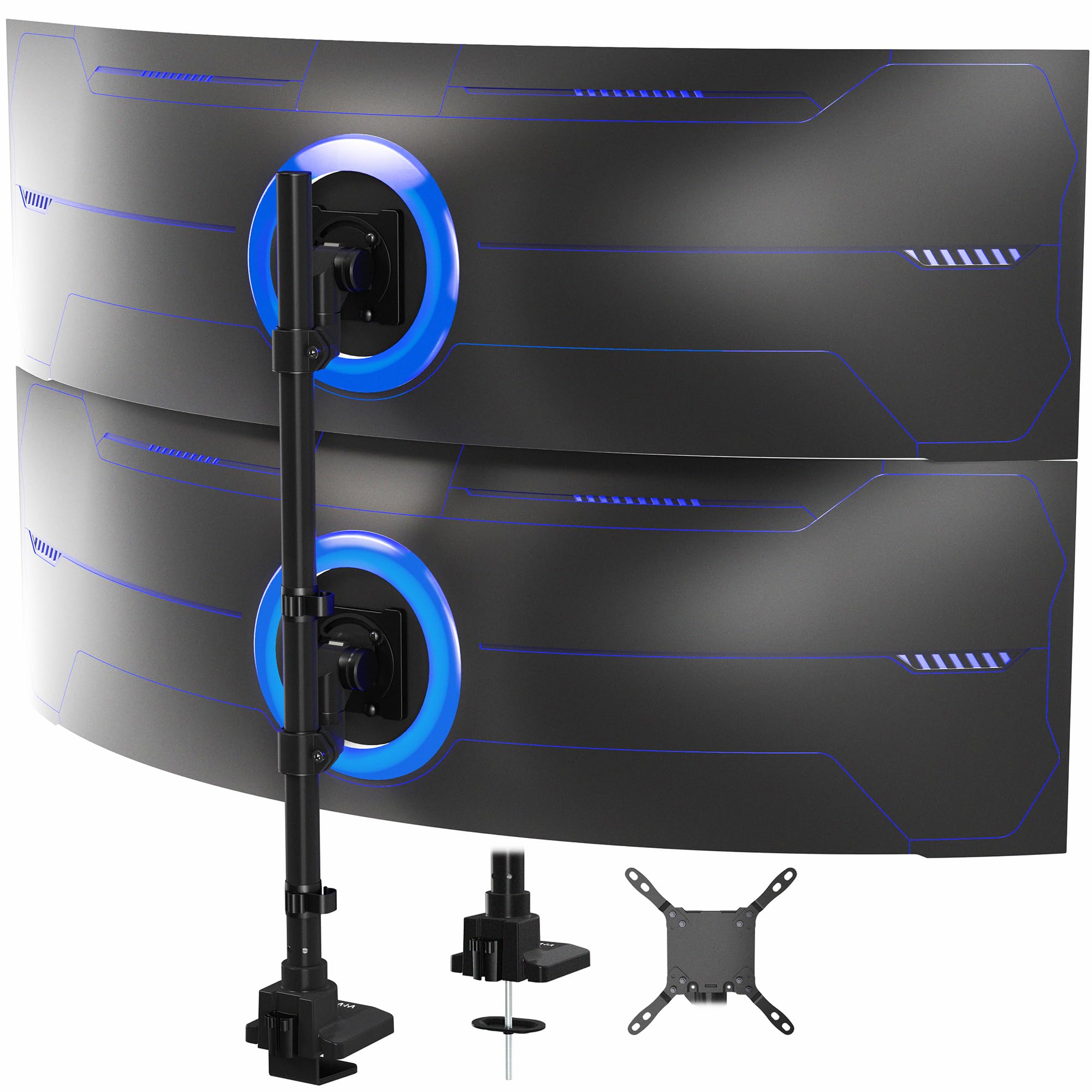
The VIVO STAND-V257R is built for a specific setup: two large ultrawide displays arranged vertically on one desk mount.
This VIVO Dual Vertically Stacked Ultrawide Monitor Desk Mount review looks at its screen capacity, movement range, mounting options, and the fit checks that matter before buying.
VIVO STAND-V257R Review Summary
The quick verdict
2,000+ ratings
Read Amazon ReviewsVIVO STAND-V257R Dual Ultrawide Monitor Mount
A desk-clamped vertical mount for buyers stacking two large ultrawides who need substantial screen capacity and flexible positioning.
- Supports two ultrawide displays up to 57 inches. Maximum listed screen weight is 48.4 pounds for curved screens or 59.4 pounds for flat screens.
- Also listed as compatible with TVs up to 43 inches.
- Bottom arm adjustment: +55° to −35° tilt, 132° swivel, and 180° rotation. Top arm adjustment: 360° swivel and 360° rotation.
- Height adjusts along the center pole to change the vertical placement of the displays.

Pros
- A high stated screen-size limit makes it relevant to unusually large ultrawide displays.
- The flat-screen weight limit is higher than the curved-screen limit, giving buyers a clear capacity distinction to check.
Consider before buying
- The desk attachment has specific thickness limits: 1.45 inches for the C-clamp and 1.26 inches for the optional grommet mount.
- The maximum supported weight differs by screen type, so buyers need to confirm the actual weight of each display and which limit applies.
Read the full review summary
The defining appeal is its scale. The mount supports two ultrawide screens up to 57 inches, with maximum listed screen weights of 48.4 pounds for curved displays and 59.4 pounds for flat ones.
That capacity and vertical layout make it a candidate for workstations where two large displays need to occupy a single desk position rather than spread side by side.
Its arms offer distinct movement ranges, and height adjustment along the center pole helps tailor the stacked arrangement.
A C-clamp or optional grommet mount secures it to the desk, while detachable VESA plates and cable clips address installation and cord routing.
Buyers should check each display's weight, mounting-hole pattern, desk edge or grommet location, and the vertical viewing position they can accommodate.
The buying factors
VIVO STAND-V257R Scorecard
Editorial scores reflect listed features and buyer fit; they are not laboratory measurements or customer ratings.
Large-screen capacity
Supports two ultrawide displays up to 57 inches, with substantial but different maximum weights for curved and flat screens.
Mounting flexibility
Offers a C-clamp installation or an optional grommet mount, subject to different desk-thickness limits.
Position adjustment
The arms have tilt, swivel, and rotation movement, plus height adjustment along the center pole.
VESA coverage
Supports several common patterns through 200 × 200 mm, including 75 × 75 and 100 × 100 mm.
Desk-space efficiency
A vertical arrangement can place two large screens in one mounting position and avoids needing two separate stands on the desktop.
Setup versatility
Detachable VESA plates and cable clips help with installation and routing, but careful compatibility and desk checks remain important.
Key Features and Specifications of VIVO STAND-V257R
- Supports two ultrawide displays up to 57 inches. Maximum listed screen weight is 48.4 pounds for curved screens or 59.4 pounds for flat screens.
- Also listed as compatible with TVs up to 43 inches.
- Bottom arm adjustment: +55° to −35° tilt, 132° swivel, and 180° rotation. Top arm adjustment: 360° swivel and 360° rotation.
- Height adjusts along the center pole to change the vertical placement of the displays.
- Attaches with a heavy-duty C-clamp to surfaces up to 1.45 inches thick, or with an optional grommet mount for surfaces up to 1.26 inches thick.
- Detachable VESA plates support 75 × 75, 100 × 100, 200 × 100, 100 × 200, and 200 × 200 mm patterns.
- Cable clips on the center pole help organize power and AV cords. The mount is made with aluminum, steel, and plastic and includes a three-year warranty.
Pros and Cons of VIVO STAND-V257R
Pros
- A high stated screen-size limit makes it relevant to unusually large ultrawide displays.
- The flat-screen weight limit is higher than the curved-screen limit, giving buyers a clear capacity distinction to check.
- The two arms provide different movement ranges, including full rotation and swivel on the top arm.
- Both clamp and optional grommet mounting are available, with detachable VESA plates for attaching screens.
- Cable clips on the pole offer a straightforward way to guide cords through the stacked setup.
Consider before buying
- The desk attachment has specific thickness limits: 1.45 inches for the C-clamp and 1.26 inches for the optional grommet mount.
- The maximum supported weight differs by screen type, so buyers need to confirm the actual weight of each display and which limit applies.
- A vertical stack needs enough usable height and a comfortable sightline for both screens; measure the workspace and planned display positions before installation.
Who Should Buy VIVO STAND-V257R?
Good fit
Consider this mount if you want two very large ultrawide screens arranged one above the other and each display falls within the relevant size and weight limits.
Its VESA support extends through 200 × 200 mm, so check the monitor's mounting pattern rather than relying on screen size alone.
It also suits a desk where a clamp or grommet attachment is practical and where vertical stacking makes better use of the available surface.
The arm movements and pole height adjustment give you ways to position the displays, while detachable plates and cable clips help with assembly and cord routing.
Before choosing it, map out the complete setup: desk thickness and clamp clearance, grommet location if applicable, screen weights, VESA patterns, and the height of the upper display.
Those checks matter especially with large screens, where a workable arrangement depends on the whole desk and viewing position.
Who should skip it
Skip this design if your desk is outside the stated attachment thickness limits, or if either display exceeds the applicable screen-size, weight, or VESA limits.
A vertical mount is also a poor fit when you need the displays side by side or cannot place the upper screen at a comfortable height.
How the VIVO STAND-V257R Fits a Two-Ultrawide Setup
Capacity for unusually large displays
The 57-inch maximum sets this mount apart for buyers whose displays are much larger than conventional office monitors.
That number does not by itself establish fit: compare each display's weight and VESA pattern against the mount's limits, and use the lower listed weight maximum for curved screens.
A vertical layout has a height cost
Stacking screens concentrates them over one desk position, which can suit a narrow workstation or a workflow that uses two large displays.
It also places the upper screen higher than a side-by-side arrangement, so plan the full vertical span and viewing position before fastening the mount.
Movement differs between arms
The bottom arm provides tilt, swivel, and rotation, while the top arm offers full swivel and rotation.
The top arm's described adjustment range does not list tilt, so if tilting the upper display is important to your layout, check that requirement against the mount's actual movement before buying.
Desk attachment and installation planning
The C-clamp supports surfaces up to 1.45 inches thick; the optional grommet mount supports surfaces up to 1.26 inches.
Detachable VESA plates can make it easier to attach screens before placing them on the arms, but buyers still need to confirm desk access, attachment location, and clearance for the completed stack.
Alternatives to VIVO STAND-V257R
Computer Monitor Arms alternative
2,000+ ratings
Read Amazon ReviewsVIVO STAND-V120T Dual Ultrawide Monitor Mount
Choose the STAND-V257R when the larger stated screen-size capacity and vertical stacking are central to your setup.
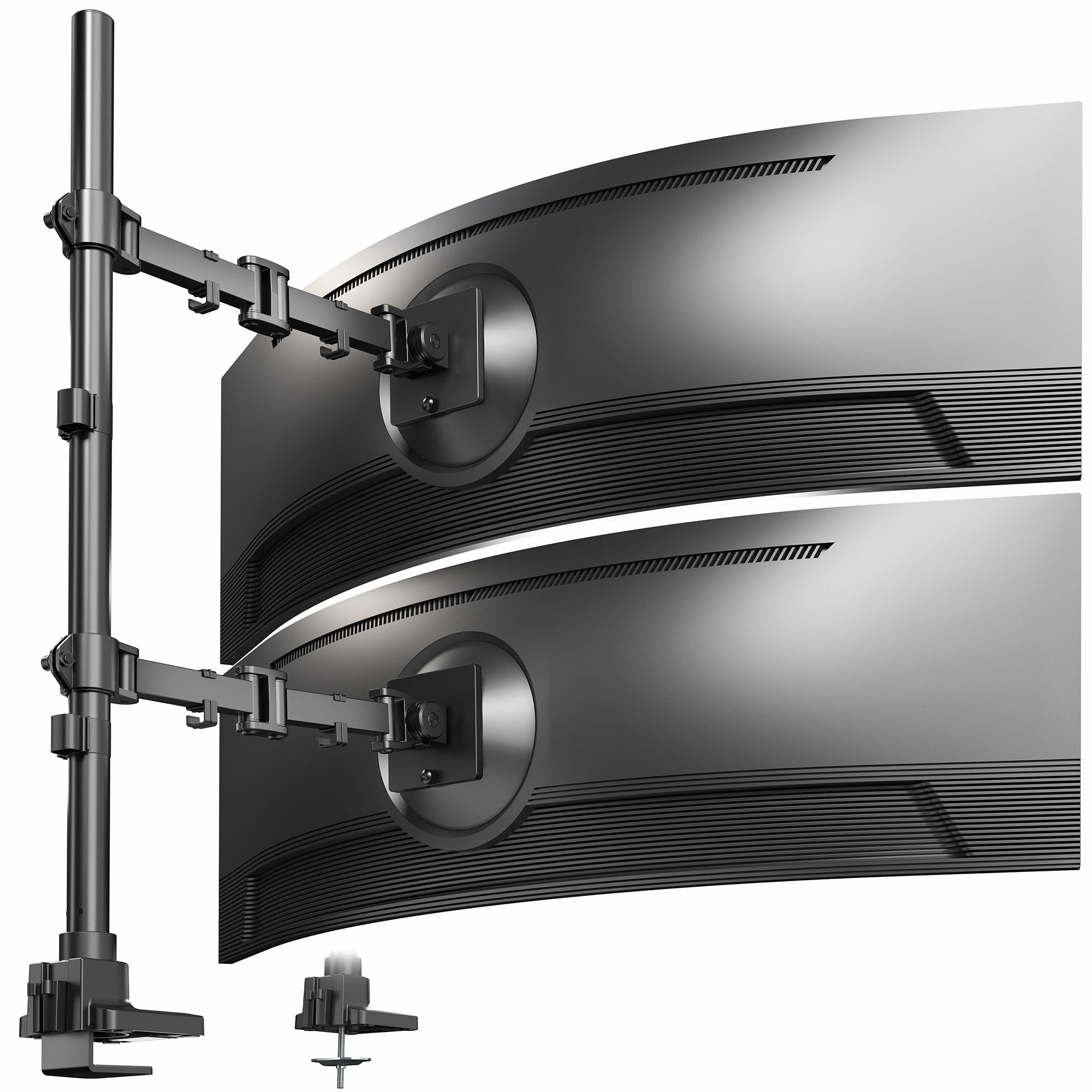
Consider the STAND-V120T if your screens fit its lower limits and you prefer the listed dual-arm format with greater stated desk-thickness limits.
- The STAND-V120T is a dual-arm mount for ultrawides up to 49 inches and 44 pounds each.
- It provides tilt, swivel, and rotation, and supports C-clamp attachment to desks up to 1.7 inches thick or optional grommet mounting up to 1.5 inches.
- The STAND-V257R is designed for vertically stacked ultrawides up to 57 inches, with separate arm movement ranges and clamp or optional grommet mounting.
Computer Monitor Arms alternative
3,000+ ratings
Read Amazon ReviewsVIVO STAND-V002L Freestanding Vertical Dual Monitor Stand
Choose the STAND-V257R for larger ultrawides or when attaching the mount to the desk is preferred.
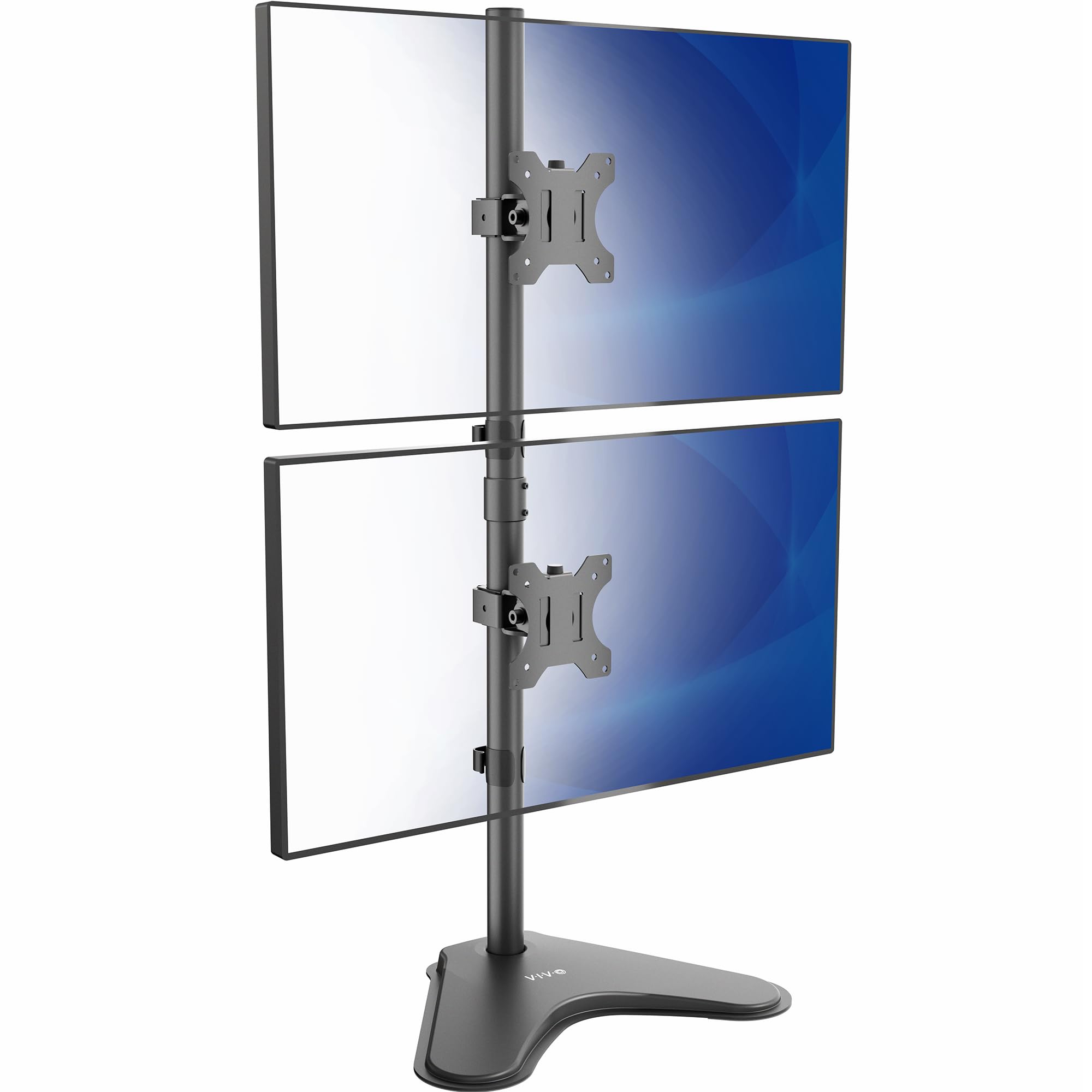
The STAND-V002L is a possible fit for smaller, lighter screens when a freestanding base suits the desk better and the base footprint can be accommodated.
- The STAND-V002L is a freestanding stacked stand for screens up to 34 inches and 22 pounds each.
- It has a 15.4 × 12.4 inch base and adjustable brackets with tilt, swivel, and rotation.
- The STAND-V257R attaches to the desk with a C-clamp or optional grommet mount and supports ultrawides up to 57 inches, subject to its screen-specific weight limits.
Is VIVO STAND-V257R Worth It?
The VIVO STAND-V257R is worth considering for a carefully planned vertical setup with two exceptionally large ultrawide displays.
Its 57-inch screen limit, substantial weight capacities, multiple VESA patterns, and adjustable arms address a specialized need that many standard dual mounts do not.
Confirm both screens' weights and mounting patterns, then measure desk thickness and the viewing height of the upper display.
If those checks work for your setup, the clamp or grommet options and arm adjustments make this a compelling format to consider; if not, a smaller-screen mount or a side-by-side layout will be a better match.
Your review at a glance
2,000+ ratings
Read Amazon ReviewsVIVO STAND-V257R Dual Ultrawide Monitor Mount
A desk-clamped vertical mount for buyers stacking two large ultrawides who need substantial screen capacity and flexible positioning.
- Supports two ultrawide displays up to 57 inches. Maximum listed screen weight is 48.4 pounds for curved screens or 59.4 pounds for flat screens.
- Also listed as compatible with TVs up to 43 inches.
- Bottom arm adjustment: +55° to −35° tilt, 132° swivel, and 180° rotation. Top arm adjustment: 360° swivel and 360° rotation.
- Height adjusts along the center pole to change the vertical placement of the displays.